DSL: The Phone Line That Does Double Duty
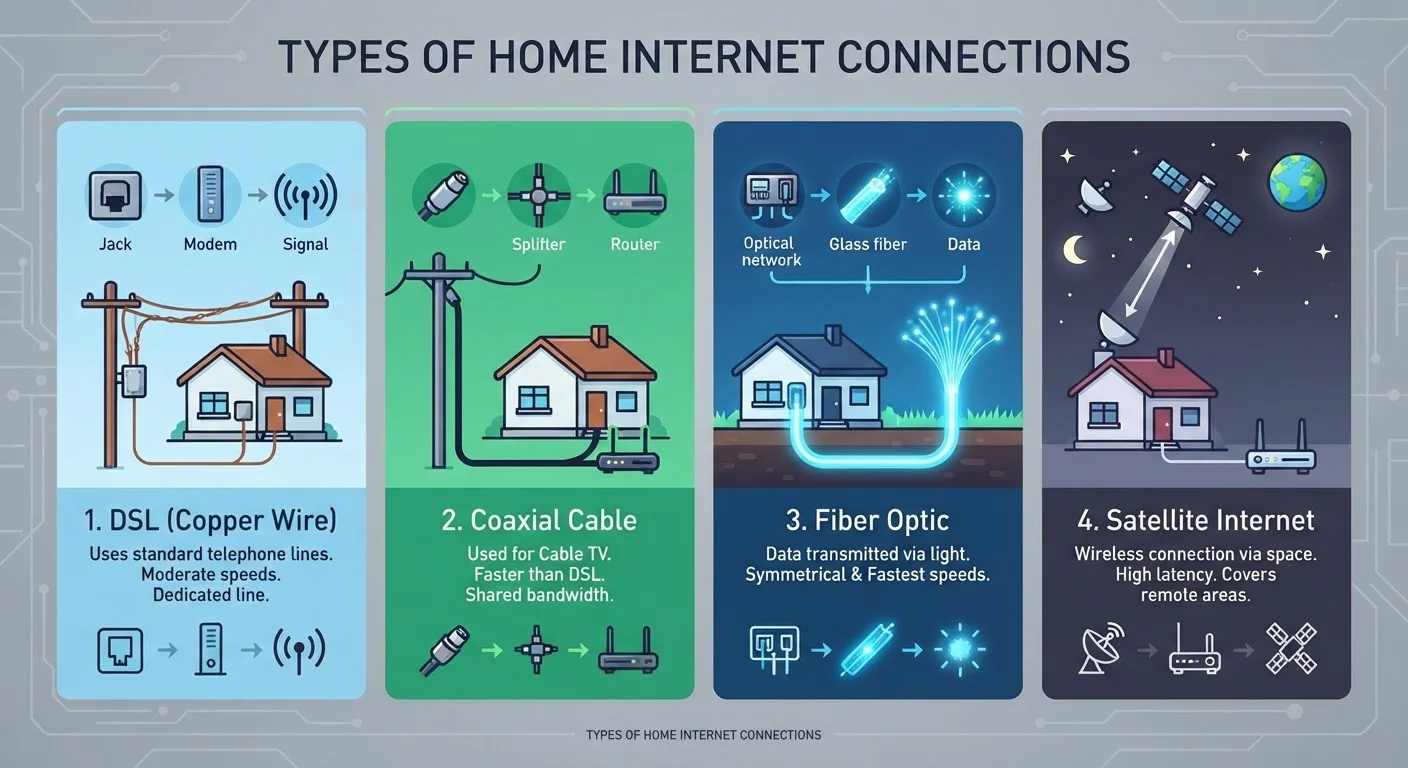
Digital Subscriber Line (DSL) internet travels over the same copper telephone wires that traditional landline calls use. A device called a DSL modem separates the internet signal from the voice signal, so both can operate simultaneously on the same line.
Because the copper infrastructure is already widely deployed, DSL reaches many areas that lack newer cable or fiber buildouts. That broad footprint is its main advantage. The tradeoff is speed: DSL connections are limited by the quality and length of the copper line between your home and the telephone company's nearest switching facility. The farther you are from that facility, the weaker the signal and the slower the connection. Speeds typically range from a few Mbps to around 100 Mbps, though the lower end of that range is more common in practice.
DSL is a reasonable entry point for light browsing and email, but households with multiple simultaneous streamers or remote workers may find it falls short. Understanding how speed requirements scale is covered in depth in our guide on what internet speed you actually need at home.
Cable: Built on TV Infrastructure
Cable internet piggybacks on the coaxial cable networks that providers originally built to deliver television programming. A cable modem at your home converts the signal, and a splitter can allow the same physical line to carry both TV service and internet simultaneously.
Cable typically delivers faster download speeds than DSL - commonly ranging from 100 Mbps to over 1 Gbps depending on the plan and local network - making it one of the most widely available higher-speed options in suburban America. However, cable networks use a shared architecture: households in the same neighborhood draw from a common pool of bandwidth. During evenings when many people stream video or work from home, that shared capacity can lead to slower, less consistent speeds.
Upload speeds on cable have historically lagged behind download speeds, which matters for video calls, cloud backups, and uploading large files. Newer cable standards (such as DOCSIS 3.1) have improved this, but fiber generally still holds the edge on upload symmetry.
~88%
U.S. households with fixed broadband access
According to FCC fixed broadband deployment data, the vast majority of American addresses have at least one wired or fixed wireless broadband option available.
600+ ms
Typical latency for geostationary satellite
Industry measurements consistently place round-trip latency for traditional GEO satellite connections above 600 milliseconds, compared to under 10 ms for fiber.
~25%
Rural Americans lacking high-speed broadband access
FCC and NTIA research indicates that a significant portion of rural households still lack access to broadband at the federal threshold of 25 Mbps download / 3 Mbps upload.
Fiber: Light-Speed Data Transmission
Fiber optic internet encodes data as pulses of light and transmits them through thin strands of glass or plastic. Because light experiences virtually no signal degradation over distance and is immune to electrical interference, fiber delivers both high speeds and low latency with exceptional consistency.
Fiber plans frequently offer symmetrical speeds - meaning upload and download rates are equal - which is a meaningful advantage for remote workers, content creators, and multi-person households. Speeds of 500 Mbps, 1 Gbps, and beyond are commercially available in fiber-served areas.
The primary barrier is infrastructure. Laying fiber requires significant physical construction, which makes buildout slower and more expensive than upgrading existing copper or coaxial networks. Availability remains concentrated in cities and growing suburbs, with many rural communities still waiting for access.
Check Fiber Availability Before Assuming It's Unavailable
Fiber buildouts have accelerated significantly in recent years, and many neighborhoods that lacked access even two or three years ago now have options. It's worth checking directly with providers and the FCC's broadband map periodically, especially if your current connection feels inadequate.
Satellite: Reaching Where No Wire Can
Satellite internet bypasses ground-based cables entirely by communicating with orbiting satellites. A dish mounted on or near your home sends and receives signals to a satellite, which relays data to a ground station connected to the broader internet.
The critical distinction in today's satellite market is orbital altitude. Traditional geostationary (GEO) satellites orbit at roughly 22,236 miles above Earth. That enormous distance introduces round-trip signal latency typically exceeding 600 milliseconds - a delay imperceptible in email but very noticeable in video calls or online gaming. Low-Earth orbit (LEO) satellite systems orbit at a few hundred miles, reducing latency to 20-60 ms in many reported cases, which is a significant improvement.
Satellite internet remains the primary option for households in rural and remote areas where DSL, cable, and fiber simply don't reach. Weather - particularly heavy rain and dense cloud cover - can intermittently affect signal quality. Data caps are also more common with satellite plans than with wired alternatives.
For a full breakdown of terminology you'll encounter when evaluating any of these connection types, see our plain-English internet plan glossary.
How to Think About Your Options
Choosing among these technologies is largely a question of what's available at your specific address - not simply which technology sounds most appealing. Before evaluating speed tiers or pricing, determine which connection types actually serve your location. The FCC's National Broadband Map at broadbandmap.fcc.gov is a useful starting point, though provider-level confirmation is always advisable.
Once you know what's available, consider how your household actually uses the internet. Latency matters more than raw speed for gaming and video conferencing. Symmetric upload speeds matter for remote work and content creation. Peak-hour consistency matters if your household streams video on multiple devices simultaneously. These use-case considerations are explored further in our piece on common myths about home internet speed.